
Welcome to the MapDirectionsWizard.dll FAQ Page!
Published by:
Calvin Smith
Software Contracts-R-Us
Client list:
WEB URL: http://www.CalvinSmithSoftware.com/
Internet E-Mail: JobForCalvin@Yahoo.com
Questions and Answers
=====================
Q: How do I get the MapDirectionsWizard.dll to
map directions using FROM and TO locations?
-------------------------------------------
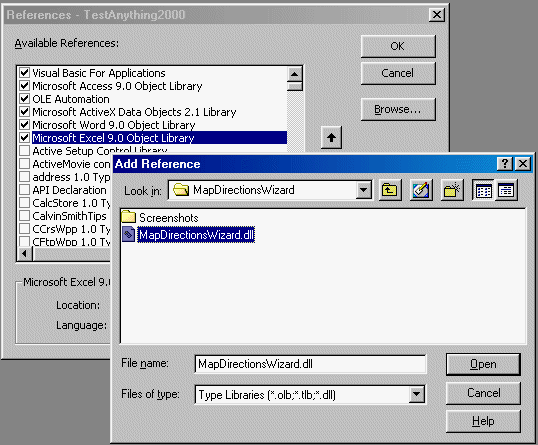
A: You will need to "Reference" the MapDirectionsWizard.dll file from your module menu.
Use the Browse button to locate that file on your system.
NOTE: Sometimes, MS Access does not show DLL files when searching for files to reference.
So, once you locate the directory, simply type in the MapDirectionsWizard.dll filename.
After the "Reference" has been taken care of, all you do is call the function
behind your command button like the following example:
Dim bRetVal As Boolean
bRetVal = MapDirections("101", "Market", "San Francisco", "CA", "854", "Seventh Ave", "NYC", "NY")
That's it!
To access the "Reference" screen, you need to be within any module and select Tools, References
from the menu bar. Next, press the Browse button to locate the DLL. See screen shot examples below:
Q: What O/S does the MapDirectionsWizard.dll file run in?
-------------------------------------------
A: The MapDirectionsWizard.dll file runs on Win9x, Win2000, and NT platforms.
Known Problems & Application Notes
==================================
* No problems to report after testing on Win9x, Win2000, XP, and NT platforms.
* No warranty express or implied, is given as to the use of this DLL (Dynamic Link Library).
We hope that you find the MapDirectionsWizard.dll utility very useful. Please tell others
about it.